Foxglove 2.43.0
🗓️ Introducing Event Types
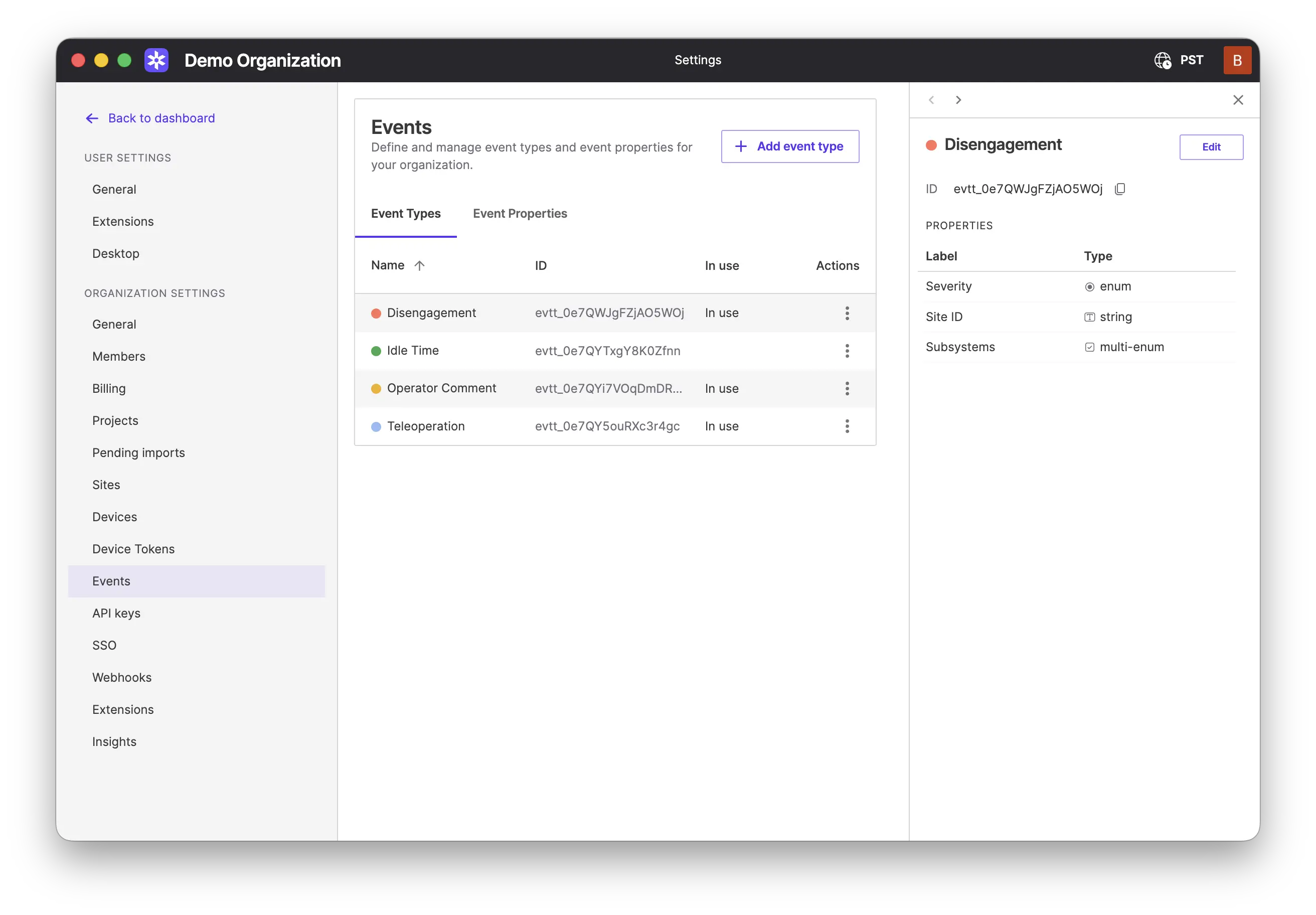
Event Types extend Events with structured schemas for timeline annotations. Instead of free-form key/value metadata, you can define custom properties that standardize how your team captures information during playback.
Define your schema in Settings: Create Event Types with custom properties (text, number, boolean, etc.) and mark properties as required to ensure critical fields are always filled in. You can also see which types and properties are actively in use across your recordings.
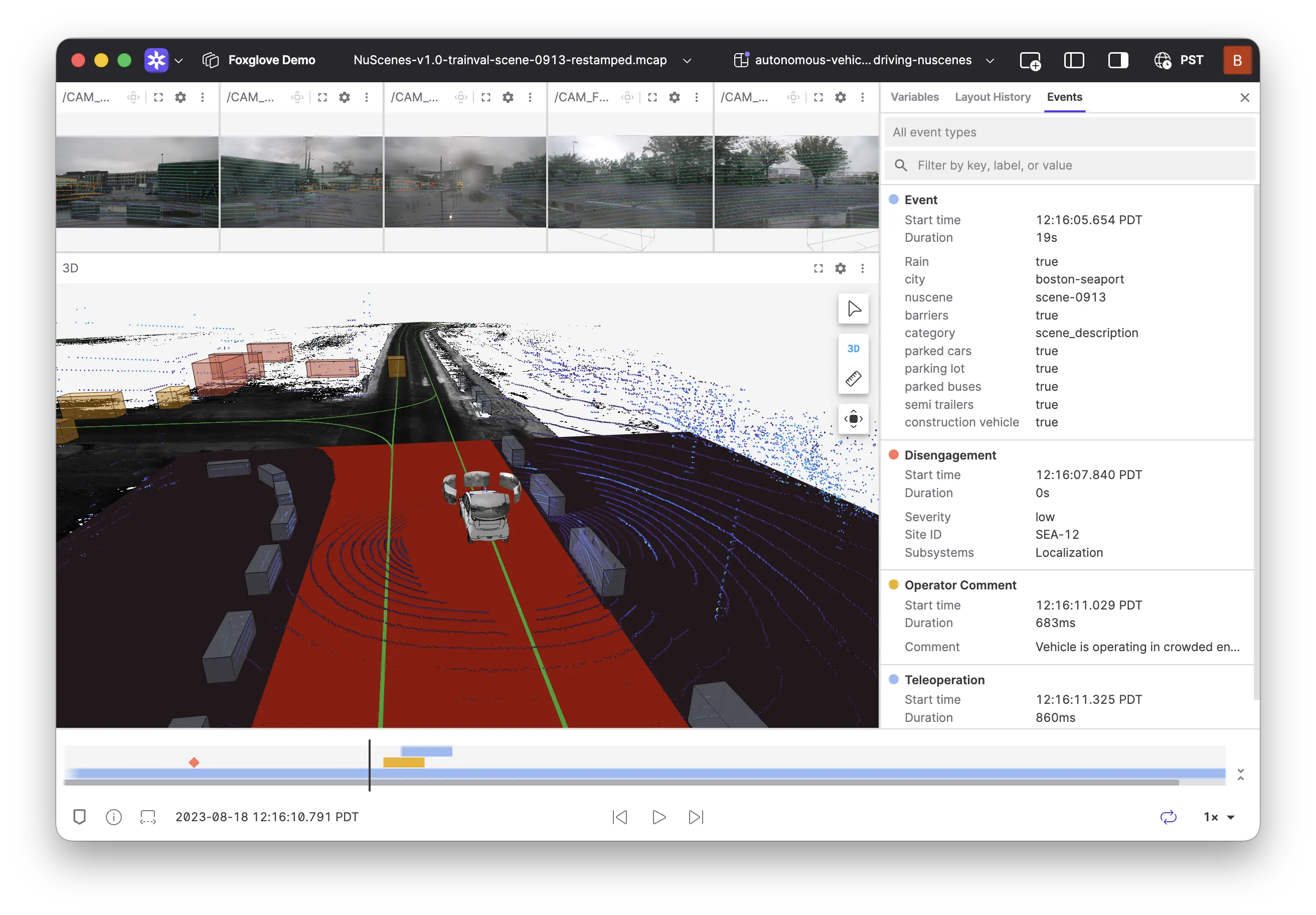
Improved visualization experience: Events on the playback bar are now colored by their Event Type, and filtering dims non-matching events, so you always know what exists. Edit events in a dedicated sidebar with inline validation, or drag to resize directly on the timeline. Events can have zero duration (instant markers) or span a time range.
API support: A full REST API is available for managing Event Types and querying typed events. Query events by metadata, typed properties, or both, and create or update typed events programmatically with property validation.
curl -X POST https://api.foxglove.dev/v1/event-types \
  -H "Content-Type: application/json" \
  -H "Authorization: Bearer $FOXGLOVE_API_KEY" \
  -d '{ "name": "Hardware Fault", "colorName": "red" }'
📐 Plane Projection for Camera Topics
You can now project camera images onto a reference plane in the 3D panel. This is especially useful for ground-plane projection, giving you a top-down view of camera data overlaid on your 3D scene. Select a projection frame from available transforms to map the camera output onto that plane.
New & Improved
- You can now add panels without first creating a layout—Foxglove will automatically create a default layout for you
- Linked selection highlights now extend to distorted image panels, showing cube outlines projected through the camera model
- Property chips in the event table now display human-readable labels, and URL values are clickable links
- Added a confirmation dialog when deleting user scripts to prevent accidental loss
- The Diagnostics panel now allows setting a custom title
- Errors during extension initialization are now displayed in the Problems sidebar
- Videos in the Image panel now fetch the previous keyframe and show content when paused
Performance
- Improved depth map point cloud rendering performance
Fixes
- Fixed ROS 2 bag (db3) playback returning incorrect data when seeking and causing out-of-memory errors
- Fixed Plot panel autoscaling behavior
- Fixed State Transitions panel jitter when time window mode is set to Sliding
- Improved error reporting for unsupported audio codecs in the Audio panel
- Fixed point clouds losing color information when depth values were invalid (NaN)
- Fixed the fixed frame selector not showing the root frame when its name is an empty string
- Fixed desktop app launching twice when clicking "Open in Desktop"
- Fixed URDF material colors not being applied to OBJ meshes without embedded materials
- Fixed Plot panel failing to display all data when resetting zoom on some scatter plots
- Fixed Kannala-Brandt and Fisheye62 distortion models when all distortion coefficients are zero
- Fixed disabled topics still showing points in the Map panel
- Fixed Raw Messages panel crash when diffing messages containing BigInt values
- Fixed Shift+Scroll shortcut in the State Transitions panel to scroll vertically
- Fixed annotation offset when hardware video decode is disabled
- Fixed synchronized image annotations appearing in the next frame instead of the current one
- Improved handling of incomplete deep links in the desktop app
Downloads: Linux: deb amd64 arm64, snap amd64 | Windows: Universal | Mac: Universal