FoxQL
FoxQL is an expression language for selecting and transforming data in Foxglove. FoxQL expressions can name a topic, navigate into its fields, and transform output.
Use FoxQL wherever Foxglove asks for an expression — for example in the Plot, Raw Messages, State Transitions, Gauge, and Indicator panels, and in search conditions.
FoxQL was previously referred to as "message path syntax".
Topics and fields
Reference this sample message for the /my_models topic:
{
  "total": 4,
  "objects": [
    { "width": 10, "height": 20 },
    { "width": 15, "height": 30 },
    { "width": 20, "height": 40 },
    { "width": 25, "height": 50 }
  ]
}
Specify the topic name to display all messages for that topic:
/my_models =>
  {
    total: 4,
    objects: [
      { width: 10, height: 20 },
      { width: 15, height: 30 },
      { width: 20, height: 40 },
      { width: 25, height: 50 }
    ]
  }
To access nested fields, first specify the topic, then use dot notation . to drill down into a nested field:
/my_models.total => 4
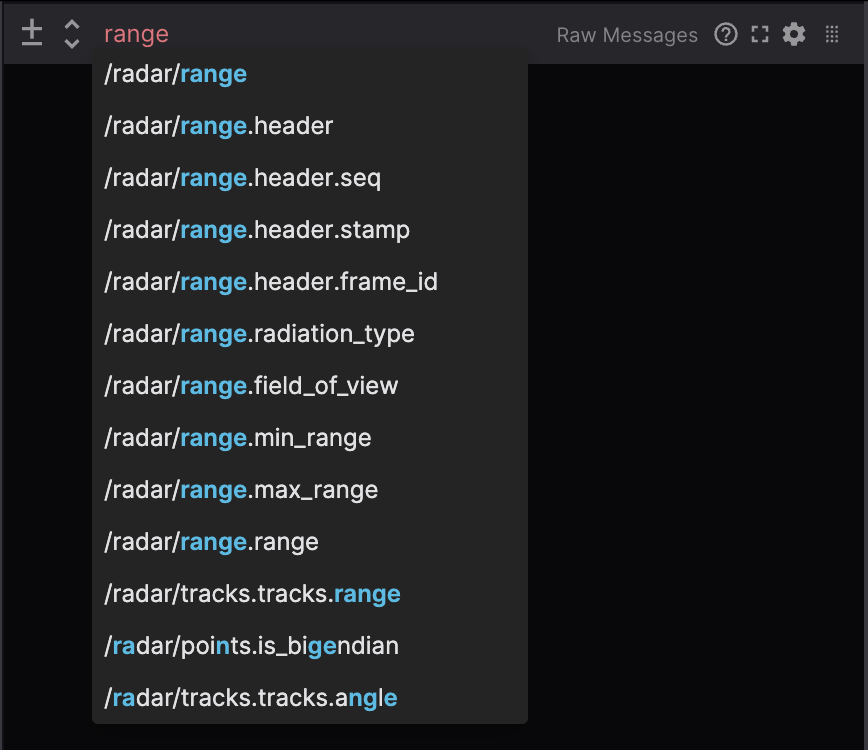
Typing in an expression input will display a list of matching autocomplete options. Any topics or nested fields that contain the input text will be included in this list.
Indexing into an array
Index into an array with bracket notation:
/my_models.objects[1].width => 15
/my_models.objects[-1].width => 25
Nested arrays (arrays of arrays) are not supported by FoxQL.
Slices
Reference this sample message for the /my_options topic:
{
  "colors": [
    { "r": 10, "g": 20, "b": 100 },
    { "r": 15, "g": 30, "b": 50 },
    { "r": 20, "g": 40, "b": 20 },
    { "r": 25, "g": 50, "b": 70 },
    { "r": 30, "g": 60, "b": 90 }
  ],
  "numbers": [3, 5, 7, 9, 10]
}
Slices will return an array of values:
/my_options.colors[1:2] => [{ r: 15, g: 30, b: 50 }, { r: 20, g: 40, b: 20 }]
/my_options.numbers[-2:-1] => [9, 10]
Using dot notation after an array of objects will map through to access each element's nested field:
/my_options.colors[1:3].r => [15, 20, 25]
/my_options.colors[:].g => [20, 30, 40, 50, 60]
Using variables to slice
Slice on a variable by prepending each variable name with a $. For example, setting my_start_idx to 3 and my_end_idx to 4:
/my_options.colors[$my_start_idx:$my_end_idx] => [{ r: 25, g: 50, b: 70 }, { r: 30, g: 60, b: 90 }]
/my_options.colors[$my_start_idx:$my_end_idx].b => [70, 90]

/my_options.numbers[$my_start_idx:$my_end_idx] => [9, 10]
Filters
Reference these sample messages for the /my_books topic:
// message 1
{
  stats: {
    pages: 100,
    author: "Beatrice Potter"
  },
  readers: [
    { id: 1, name: "Ashley", isCurrentlyReading: true },
    { id: 2, name: "Baron", isCurrentlyReading: false },
    { id: 3, name: "Charlie", isCurrentlyReading: true }
  ]
}

// message 2
{
  stats: {
    pages: 210,
    author: 'Tommy "Two Gun" Simon'
  },
  readers: [
    { id: 4, name: "Dana", isCurrentlyReading: true },
    { id: 5, name: "Ethan", isCurrentlyReading: false },
    { id: 6, name: "Frank", isCurrentlyReading: false }
  ]
}
Filter messages based on their fields’ boolean, number, or string values. The following comparison operators are supported: ==, !=, <, <=, >, >=.
Create filters in FoxQL using curly brackets. Messages that don't match the filter will be skipped entirely:
/my_books{stats.pages>200} =>
  {
    stats: {
      pages: 210,
      author: 'Tommy "Two Gun" Simon'
    }
  }

/my_books{stats.pages==100}.author => "Beatrice Potter"

/my_books{stats.pages==500} => // no value returned
Filtering on nested fields
You can also filter on a message’s nested field values using a combination of slices and filters:
/my_books.readers[:]{isCurrentlyReading==true}.name =>
  ["Ashley", "Charlie"] // message 1
  ["Dana"] // message 2
Using variables to filter
In addition to filtering on primitive values, you can filter on variables. Setting variable my_id to 1:
/my_books.readers[:]{id==$my_id} =>
  { id: 1, name: "Ashley", isCurrentlyReading: true } // message 1
  // No value returned for message 2
Using multiple filters
When you apply multiple filters, only messages that satisfy all filters will be returned (in other words, an AND expression):
/my_books.readers[:]{id==1}{isCurrentlyReading==true}.name =>
  "Ashley" // message 1
  // No value returned for message 2

/my_books.readers[:]{id==1}{isCurrentlyReading==false}.name =>
  // No value returned for message 1
  // No value returned for message 2

/my_books.readers[:]{id==5}{isCurrentlyReading==false}.name =>
  // No value returned for message 1
  "Ethan" // message 2
Other considerations
Escaping quotation marks in strings is not supported, but you can use single or double quotes, which allows you to express most strings:
/my_books{stats.author=='Tommy "Two Gun" Simon'}.readers[:].name =>

  // No value returned for message 1
  ["Dana", "Ethan", "Frank"] // message 2
Enum names in filters
For fields with enum types, you can filter using the enum name instead of the numeric value:
/my_topic{status==MOVING}    // filters where status field equals the MOVING enum value
/my_topic{status==2}         // equivalent numeric filter
Enum names are unquoted bare words. They are case-sensitive and must match the enum definition exactly. If the name doesn't match any defined enum value, the filter matches nothing.
For boolean fields, the parser recognizes true and false as boolean values:
/my_topic.readers[:]{isActive==true}.name
The parser does not treat quoted strings as enum names. Use unquoted identifiers for enums and quoted strings for string comparisons:
/my_topic{status==OK}        // enum name, resolved to numeric value
/my_topic{name=="OK"}        // string comparison
Variables cannot be used outside of slicing and filtering in expressions.
Functions
The Plot, Raw Messages, State Transitions, Gauge, and Indicator panels support appending a function suffix to transform the final value returned by an expression. Support varies by panel:
| Function category | Plot | Raw Messages | State Transitions | Gauge | Indicator |
|---|---|---|---|---|---|
Scalar (@abs, @degrees, @radians, and similar functions) | ✓ | ✓ | ✓ | ✓ | ✓ |
Operand (@add(number), @sub(number), @mul(number), @div(number)) | ✓ | ✓ | ✓ | ✓ | ✓ |
Array (@length) | ✓ | ✓ | ✓ | ✓ | ✓ |
Vector (@norm) | ✓ | ✓ | ✓ | ✓ | ✓ |
Struct (@rpy, @ypr, @yrp, @quat) | ✓* | ✓ | ✓* | ✓* | ✓* |
Time-series (@derivative, @delta, @integral, @timedelta) | ✓** | — | — | — | — |
@rpy.yaw) for scalar value; ** Timestamp x-axis only.
Use .@functionname syntax, with an optional operand for functions that accept one:
/imu.linear_acceleration.x.@abs
/wheel.speed.@mul(3.6)
/joint_states.position.@length
/imu.linear_acceleration.@norm
The sections below define each function (including vector magnitude, quaternion/RPY, and time-series behavior), plus chaining functions for how suffixes combine. Panel docs summarize what each panel supports and link here for full definitions.
Scalar
Scalar functions align with JavaScript's Math functions where applicable.
Angles use radians unless you convert with @degrees or @radians.
.@abs
Absolute value
.@acos
Arc cosine (radians)
.@asin
Arc sine (radians)
.@atan
Arc tangent (radians)
.@ceil
Round up to nearest integer
.@cos
Cosine (input in radians)
.@degrees
Convert radians to degrees
.@log
Natural logarithm
.@log1p
Natural log of 1 + value
.@log2
Base-2 logarithm
.@log10
Base-10 logarithm
.@negative
Negate the value
.@radians
Convert degrees to radians
.@round
Round to nearest integer
.@sign
Sign of value (-1, 0, or 1)
.@sin
Sine (input in radians)
.@sqrt
Square root
.@tan
Tangent (input in radians)
.@trunc
Truncate to integer
Operand
Operand functions accept one numeric argument in parentheses. Values can also come from variable references.
.@add(number)
Add a number
.@sub(number)
Subtract a number
.@mul(number)
Multiply by a number
.@div(number)
Divide by a number
Array
.@length
Length of an array or typed array
Use @length to return the JavaScript .length of an array or typed array:
/joint_states.position.@length
/markers.markers.@length
The function returns 0 for an empty array. Use the function suffix syntax (.@length) for arrays; field access like .length is reserved for message objects that actually define a field named length.
Previously, paths ending in .length, .byteLength, or .buffer on an array or typed array value resolved to the underlying JavaScript property. Those paths no longer resolve and should be migrated to .@length for length lookups; the other properties have no FoxQL equivalent.
Vector
.@norm
Computes the Euclidean norm (magnitude) of an object with x, y (and optionally z) numeric properties, or of a numeric array:
/imu.linear_acceleration.@norm
/gps.velocity.@norm
/joint_states.velocity.@norm
Struct
@rpy, @ypr, and @yrp convert a quaternion — the standard (x, y, z, w) form, with x, y, z the vector part and w the scalar part, describing a rotation in right-handed 3D space — into roll, pitch, and yaw Euler angles in radians. They differ only in the order the rotations are composed. In @ypr and @yrp, yaw is the rotation about the fixed Z axis (world-frame heading); in @rpy, yaw is measured in the body frame after roll and pitch. Append field access (for example, .yaw or .roll) for a scalar result, and chain @degrees to convert to degrees.
.@rpy
XYZ Euler order — intrinsic rotations about X (roll), then Y (pitch), then Z (yaw).
/odom.orientation.@rpy
/odom.orientation.@rpy.yaw
.@ypr
ZYX Euler order — intrinsic rotations about Z (yaw), then Y (pitch), then X (roll).
/odom.orientation.@ypr
/odom.orientation.@ypr.yaw
.@yrp
ZXY Euler order — intrinsic rotations about Z (yaw), then X (roll), then Y (pitch).
/odom.orientation.@yrp
/odom.orientation.@yrp.yaw
Ranges and wrapping (applies to @rpy, @ypr, and @yrp). These functions recover a representative set of angles, not a continuously accumulated one. Each returns the middle axis of its sequence in the range [−π/2, π/2] (pitch for @rpy and @ypr, roll for @yrp) and the other two axes in (−π, π]; no output ever falls outside ±π. A quaternion encodes only orientation, so an angle whose natural value lies outside these ranges folds back into them — for example a yaw of 270° is reported as −90°. As an orientation rotates continuously, the outer angles therefore wrap, jumping between +180° and −180°: the conversion is evaluated independently per sample with no unwrapping, so expect a sawtooth rather than a continuously accumulating heading. At the middle-axis singularity (pitch = ±90° for @rpy and @ypr, roll = ±90° for @yrp) the remaining two axes are degenerate (gimbal lock); the combined rotation is reported on one axis with the other set to 0, and values near the singularity can change sharply.
.@quat
Converts an RPY object (roll, pitch, yaw in radians) to a quaternion, as the inverse of .@rpy using the same XYZ Euler convention.
/odometry.euler.@quat
/odometry.euler.@quat.w
Append field access (for example, .w) when you need a scalar numeric result.
Time-series
When an expression includes filters, time-series modifiers use consecutive samples that match the filter (for example, /imu{sensor_id==3}.@timedelta; see @timedelta).
.@delta
Change between consecutive samples.
In the Plot panel with a timestamp x-axis, plots the change in y-value between consecutive samples: y[n] - y[n-1].
.@derivative
Rate of change between consecutive samples.
In the Plot panel with a timestamp x-axis, plots the rate of change in y-value: (y[n] - y[n-1]) / (t[n] - t[n-1]). The time values t come from the series' Timestamp setting (Log time, ROS header stamp, Publish time, or a custom field timestamp path).
.@integral
Running integral of a signal over time.
In the Plot panel with a timestamp x-axis, plots the running total of the trapezoid areas between consecutive samples: total[n] = total[n-1] + (y[n] + y[n-1]) / 2 × (t[n] - t[n-1]). The time values t come from the series' Timestamp setting.
The total starts at 0 at the first sample Plot loads, which plots no point. For a recording, this is the first sample in the recording. For a live connection, the total restarts at 0 when Plot clears its data, for example after seeking or when you change the series. Invalid values or timestamps and samples that would make the total overflow are skipped; the next valid sample uses the last accepted one.
.@timedelta
Elapsed time in seconds between consecutive samples.
In the Plot panel with a timestamp x-axis, plots elapsed time in seconds between consecutive samples: t[n] - t[n-1]. The time values t come from the series' Timestamp setting.
See the Plot panel for timestamp sources, filter behavior with consecutive samples, and valid or invalid chains that mix time-series functions with other modifiers.
Chaining functions
The sections above define each function on its own. To combine them, append additional .@ functions so each step receives the output of the previous one. Evaluation is left-to-right.
/odom.orientation.@rpy.yaw.@degrees
/odom.orientation.@rpy.roll.@abs
For example, @rpy with field access .yaw, then @degrees, as in the path .@rpy.yaw.@degrees, extracts yaw from a quaternion orientation and converts radians to degrees in one expression.
Time-series functions (@delta, @derivative, @integral, @timedelta) have extra rules: at most one may appear in a chain, and only scalar functions may follow it. How filters interact with consecutive samples for those modifiers is covered in the note under the Time-series category above. See the Plot panel for valid and invalid examples with time-series functions in a chain.