Train models with PyTorch or Ray
Once a dataset version is committed, your training code can read it directly from Foxglove. The Foxglove SDK streams a version's episodes into a PyTorch or Ray Data dataset, and you decide how each episode becomes training samples. The dataset ID and version number in your script record what the model was trained on.
Get a starting script
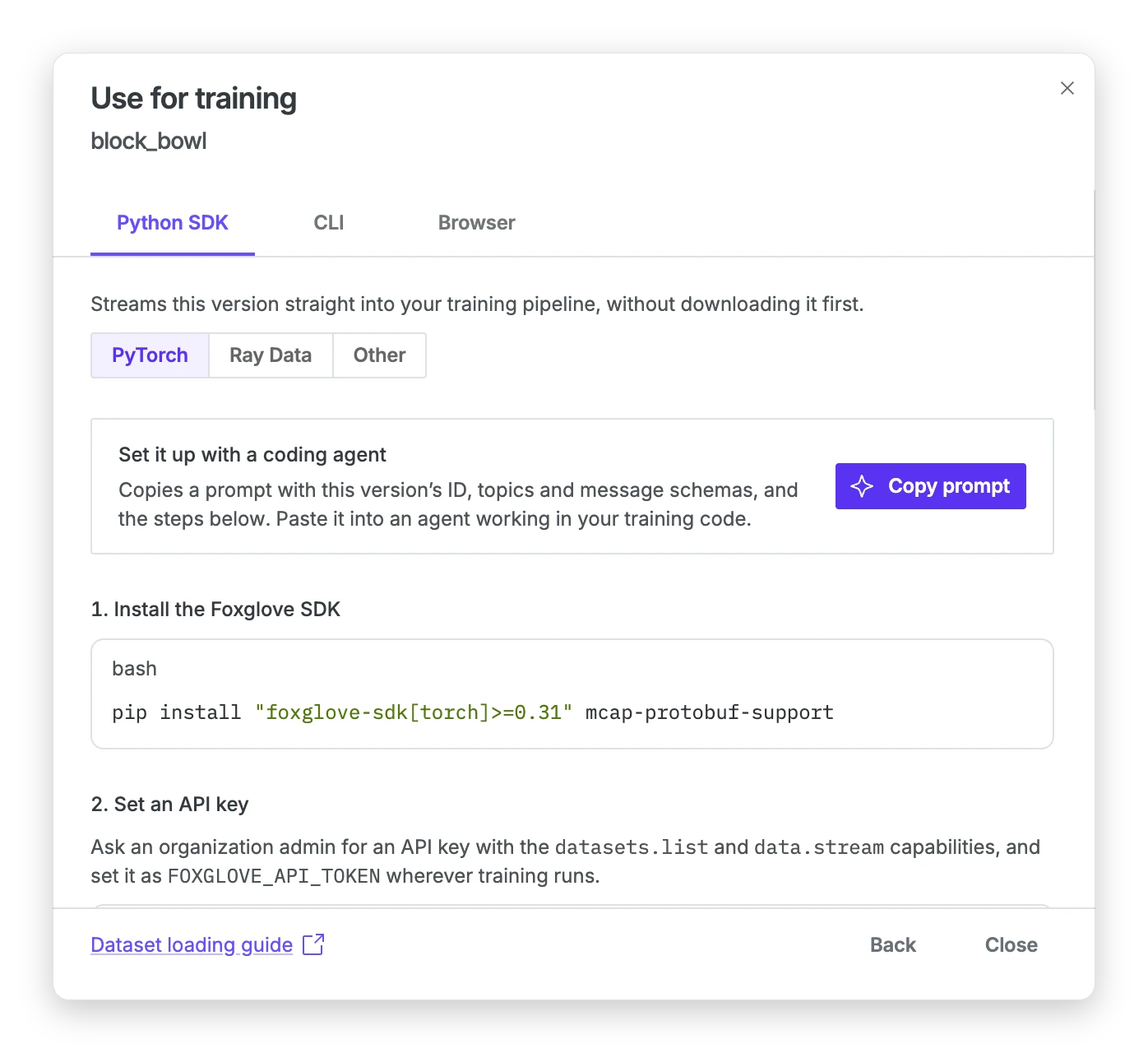
The quickest way to begin is the Use for training button on a dataset's page. Choose a Version and, if you like, the topics you want, then click Next. The latest committed version is selected by default. The draft is listed too, with a Draft tag, while it has uncommitted changes or before the first commit. Commit the draft before you train on it, because its episodes can change until then. The dialog shows a warning when you select it. On the Python SDK tab, pick PyTorch or Ray Data. The dialog shows an install command, how to set your API key, and a script with the dataset ID, version, and topics filled in.
Copy prompt copies the same details as a prompt for a coding agent that is working in your training code. The Other option gives a script that reads the version with the Python client and no training framework.
Install the SDK
Install the Foxglove SDK with the extra for your framework, and set your API key in the environment:
pip install "foxglove-sdk[torch]>=0.31" numpy
export FOXGLOVE_API_TOKEN=<your API key>
The command also installs NumPy, which the examples on this page use. Use the ray extra for Ray Data, and add the video extra to decode H.264 video. The SDK needs Python 3.10 or later. JSON messages are decoded without extra packages. For Protobuf, ROS 1, or ROS 2 messages, also install mcap-protobuf-support, mcap-ros1-support, or mcap-ros2-support.
If your Primary Site uses index-in-place storage, both readers can read the original MCAP files straight from your bucket instead. Pass source="object_storage" to read_dataset, and give each worker read access to the bucket through its own cloud credentials. Each file needs an MCAP summary with chunk and message indexes.
Load a dataset version with PyTorch
The PyTorch reader returns an IterableDataset that you pass to a DataLoader. It calls your read_episode function once for each episode and hands everything the function yields to the loader. This example reads one topic of JSON messages and yields an input and a target for each message.
import numpy as np
from foxglove.datasets import EpisodeReader
from foxglove.datasets.torch import read_dataset
from torch.utils.data import DataLoader


def read_episode(episode: EpisodeReader):
    for _schema, _channel, _message, payload in episode.iter_messages():
        yield {
            "inputs": np.asarray(
                [payload["speed"], payload["acceleration"]], dtype=np.float32
            ),
            "target": np.asarray([payload["steering"]], dtype=np.float32),
        }


if __name__ == "__main__":
    dataset = read_dataset(
        "dset_123",
        version=3,
        topics=["/training/measurements"],
        read_episode=read_episode,
    )
    loader = DataLoader(
        dataset, batch_size=32, num_workers=2, multiprocessing_context="spawn"
    )
    for batch in loader:
        print(batch["inputs"].shape, batch["target"].shape)
The reader divides the version's episodes among the loader's workers, and each worker streams its own episodes. The example starts the workers with the spawn method, as the SDK's own examples do. Each worker imports your script, so define read_episode at the top level and keep the code that loads and iterates the dataset under the __main__ guard.
Load a dataset version with Ray Data
The Ray reader takes the same read_episode function and returns a Ray dataset, which you can use like any other Ray dataset. The function must yield dictionaries with the same keys and value types for every sample, and the API key must be set on every Ray worker.
from foxglove.datasets.ray import read_dataset as read_ray_dataset

if __name__ == "__main__":
    ray_dataset = read_ray_dataset(
        "dset_123",
        version=3,
        topics=["/training/measurements"],
        read_episode=read_episode,
        concurrency=2,
    )
    for batch in ray_dataset.iter_batches(batch_size=32):
        print(batch["inputs"].shape, batch["target"].shape)
Prepare samples in read_episode
Your read_episode function is where raw messages become training samples. The SDK gives it one episode at a time and streams the topics you asked for in log-time order. Aligning topics with each other, decoding images, and downsampling all happen in this function, so the model sees the samples you intend.
The example below builds samples from a camera topic and a joint state topic. It skips episodes that a reviewer marked as rejected. It then decodes the camera's H.264 video into frames and pairs each frame with the most recent joint state. Frames with no joint state in the preceding 50 milliseconds are dropped, and each image is downsampled by a factor of two.
from foxglove.datasets.video import decode_h264

MAX_JOINT_AGE_NS = 50_000_000


def read_camera_episode(episode: EpisodeReader):
    if episode.properties.get("quality") == "rejected":
        return

    joint_times, joint_positions = [], []
    for _schema, _channel, message, joints in episode.iter_messages(
        topics=["/joint_states"]
    ):
        joint_times.append(message.log_time)
        # JSON decodes to a dict, ROS and Protobuf to an object with attributes.
        position = joints["position"] if isinstance(joints, dict) else joints.position
        joint_positions.append(position)

    for frame in decode_h264(episode, topic="/camera/front"):
        index = np.searchsorted(joint_times, frame["log_time_ns"], side="right") - 1
        if index < 0 or frame["log_time_ns"] - joint_times[index] > MAX_JOINT_AGE_NS:
            continue
        yield {
            "image": np.ascontiguousarray(frame["image"][::2, ::2]),
            "joints": np.asarray(joint_positions[index], dtype=np.float32),
        }
The reader makes an episode's properties available when you pass include_properties=True. Messages arrive already decoded, as dictionaries for JSON and as objects with attributes for ROS and Protobuf. The video decoder comes with the video extra and yields each frame as an RGB array with its topic and timestamps. The same function works with the PyTorch and Ray readers.
Split a dataset version for training and evaluation
To measure a model fairly, evaluate it on episodes it never saw in training. A DatasetSplit divides a dataset version into train, validation, and test sets. It keeps all the episodes from one recording in the same split, so two parts of a single run never land on both sides.
from foxglove.datasets import DatasetSplit, inspect_splits

if __name__ == "__main__":
    splits = DatasetSplit(train=0.8, validation=0.1, test=0.1, seed=0)
    print(inspect_splits("dset_123", version=3, split_config=splits))

    train = read_dataset(
        "dset_123",
        version=3,
        topics=["/camera/front", "/joint_states"],
        read_episode=read_camera_episode,
        include_properties=True,
        split_config=splits,
        split="train",
    )
Pass split="validation" or split="test" with the same configuration to read the held-out episodes. The proportions are probabilities for each group of episodes, so the split sizes are approximate. Call inspect_splits before you train to see how many episodes each split holds. It reads only episode metadata, so it returns quickly.
A recording is sometimes too fine a boundary. To keep everything from one site or one robot together, pass groups, which maps each episode ID to a group name. A property is a convenient source for the group names. The mapping must include every episode in the version.
import os

from foxglove.client import Client

if __name__ == "__main__":
    client = Client(token=os.environ["FOXGLOVE_API_TOKEN"])
    members = client.get_dataset_version_episodes(
        dataset_id="dset_123", version_number=3, include_properties=True
    )
    groups = {
        member["episode"]["id"]: member["episode"]["properties"]["site"]
        for member in members.auto_paging_iter()
    }
    splits = DatasetSplit(train=0.8, validation=0.1, test=0.1, seed=0, groups=groups)
The assignment depends only on the dataset version and the split configuration. The same pair gives the same splits in PyTorch and Ray, on every worker and in every epoch. Save the dataset ID, the version number, and the split configuration with your model, so you can evaluate it later on the same held-out episodes.
A split belongs to one version. In a later version, a new episode can connect two groups of recordings and move episodes to a different split. To compare models trained on different versions, use a separate evaluation dataset.
Shuffle and distribute episodes
With PyTorch, shuffling and distributed training are options of the reader.
Pass shuffle=True to shuffle the order of episodes, and call set_epoch before each pass. The shuffle uses the seed and the epoch number, so you can repeat a run. Shuffling reorders episodes, and the samples within an episode keep the order your function yields them in.
from foxglove.datasets.torch import to_image_tensor

if __name__ == "__main__":
    shuffled = read_dataset(
        "dset_123",
        version=3,
        topics=["/camera/front", "/joint_states"],
        read_episode=read_camera_episode,
        include_properties=True,
        split_config=splits,
        split="train",
        shuffle=True,
        seed=42,
    )
    loader = DataLoader(
        shuffled,
        batch_size=32,
        num_workers=2,
        multiprocessing_context="spawn",
        persistent_workers=True,
    )
    for epoch in range(3):
        shuffled.set_epoch(epoch)
        for batch in loader:
            images = to_image_tensor(batch)
            print(epoch, images.shape, batch["joints"].shape)
The loader keeps its workers running between epochs, and they pick up the new epoch on the next pass. The loop also calls to_image_tensor, which moves the color channel first, the layout most PyTorch vision models expect.
For multi-GPU training with DistributedDataParallel, call read_dataset after init_process_group, and use the same seed and epoch on every rank. The reader gives each rank its own share of the episodes, so don't add a DistributedSampler. Episodes have different lengths, so ranks can get different numbers of batches. Before each step, put 1 in a tensor on the rank's device if the rank has a batch and 0 if not, and call all_reduce on it with ReduceOp.MIN. When the result is 0, stop the epoch on all ranks. Then every rank does the same number of optimizer steps.
The Ray reader has no shuffle or rank options. It spreads a version's episodes across Ray read tasks, and concurrency caps how many run at once. The result is a regular Ray dataset, so shuffle and shard it with Ray's own tools, such as random_shuffle() and the datasets argument of a Ray Train trainer. Ray reruns read_episode when it retries a read task, so keep the function free of side effects such as writing files or calling other services.
Compare two models
When you retrain on a new dataset version, score the old model and the new one on the same episodes. Keep those episodes in a separate evaluation dataset that shares no episodes or recordings with either training version, and commit it. For stricter separation, also keep sessions, robots, or days apart, as you would with groups. A test split of the newer version is not enough for this, because that split can hold episodes the older model trained on.
The example below trains one model on Version 2 of a training dataset and another on Version 3. It first checks that the evaluation dataset shares no recordings with either version. Then it scores both models on Version 1 of the evaluation dataset and reports the mean error for each task, which it reads from the task property. Both runs use the same seed and the same settings, so in this example the training data is the only difference between them. If you shuffle episodes, pass the same seed= to read_dataset in both runs. On a GPU, also call torch.use_deterministic_algorithms(True), so that the two runs stay comparable.
import os

import torch
from foxglove.client import Client
from foxglove.datasets import EpisodeReader
from foxglove.datasets.torch import read_dataset
from torch import nn
from torch.utils.data import DataLoader

# read_episode is the function from "Load a dataset version with PyTorch".

TRAINING_DATASET_ID = "dset_123"
EVALUATION_DATASET_ID = "dset_456"
EVALUATION_VERSION = 1


def read_labeled_episode(episode: EpisodeReader):
    task = episode.properties.get("task", "unlabeled")
    for sample in read_episode(episode):
        yield {**sample, "task": task}


def load(dataset_id: str, version: int) -> DataLoader:
    dataset = read_dataset(
        dataset_id,
        version=version,
        topics=["/training/measurements"],
        read_episode=read_labeled_episode,
        include_properties=True,
    )
    return DataLoader(dataset, batch_size=32)


def recording_ids(client: Client, dataset_id: str, version: int) -> set[str]:
    members = client.get_dataset_version_episodes(
        dataset_id=dataset_id, version_number=version, include_recordings=True
    )
    return {
        recording["id"]
        for member in members.auto_paging_iter()
        for recording in member["episode"]["recordings"]
    }


def train(version: int) -> nn.Module:
    torch.manual_seed(0)
    model = nn.Linear(2, 1)
    optimizer = torch.optim.Adam(model.parameters(), lr=1e-3)
    for batch in load(TRAINING_DATASET_ID, version):
        loss = nn.functional.mse_loss(model(batch["inputs"]), batch["target"])
        optimizer.zero_grad()
        loss.backward()
        optimizer.step()
    return model


def evaluate(model: nn.Module) -> dict[str, float]:
    model.eval()
    errors: dict[str, list[float]] = {}
    with torch.no_grad():
        for batch in load(EVALUATION_DATASET_ID, EVALUATION_VERSION):
            error = (model(batch["inputs"]) - batch["target"]).abs().mean(dim=1)
            for task, value in zip(batch["task"], error.tolist()):
                errors.setdefault(task, []).append(value)
    return {task: sum(values) / len(values) for task, values in errors.items()}


if __name__ == "__main__":
    client = Client(token=os.environ["FOXGLOVE_API_TOKEN"])
    held_out = recording_ids(client, EVALUATION_DATASET_ID, EVALUATION_VERSION)
    for version in (2, 3):
        shared = held_out & recording_ids(client, TRAINING_DATASET_ID, version)
        if shared:
            raise ValueError(f"Version {version} trains on evaluation recordings: {shared}")

    for version in (2, 3):
        print("trained on version", version, evaluate(train(version)))
Both models are scored on the same episodes, and neither has seen them, so their errors can be compared directly. The breakdown by task suggests where the newer version's episodes helped. Repeat both runs with a few seeds before you draw conclusions from small differences. The scores come from your own evaluation code, and Foxglove supplies the same evaluation episodes to both runs. The check compares recordings because two episodes can cover the same recording.
Save the evaluation dataset's ID and version number with the scores. To see which episodes and labels changed between the two training versions, compare them in the app or from Python.
Links and resources
- Complete example that reads a dataset version with PyTorch or Ray Data
- Python SDK reference for dataset loading