Foxglove 3.6.0
Foxglove 3.6.0 connects your whole data workflow: ingest your data, triage it with Automations, find what matters with search, and curate it into Datasets.
🤖 Automations
Automations are now generally available on Pro and Enterprise plans. Automations review and sort recordings and events in the background as data arrives, so engineers don't review everything by hand. An automation is a saved prompt plus an optional trigger that starts an agent run against your data.
Schedule agents to run on new data, on a schedule, or manually, and integrate them with your workflows through the app, the agent sidebar, Slack, MCP, and the public API. Automations can use tools from your connected external MCP services, so a run can kick off work in the other tools your team already uses. Read more about Automations.
📊 Datasets
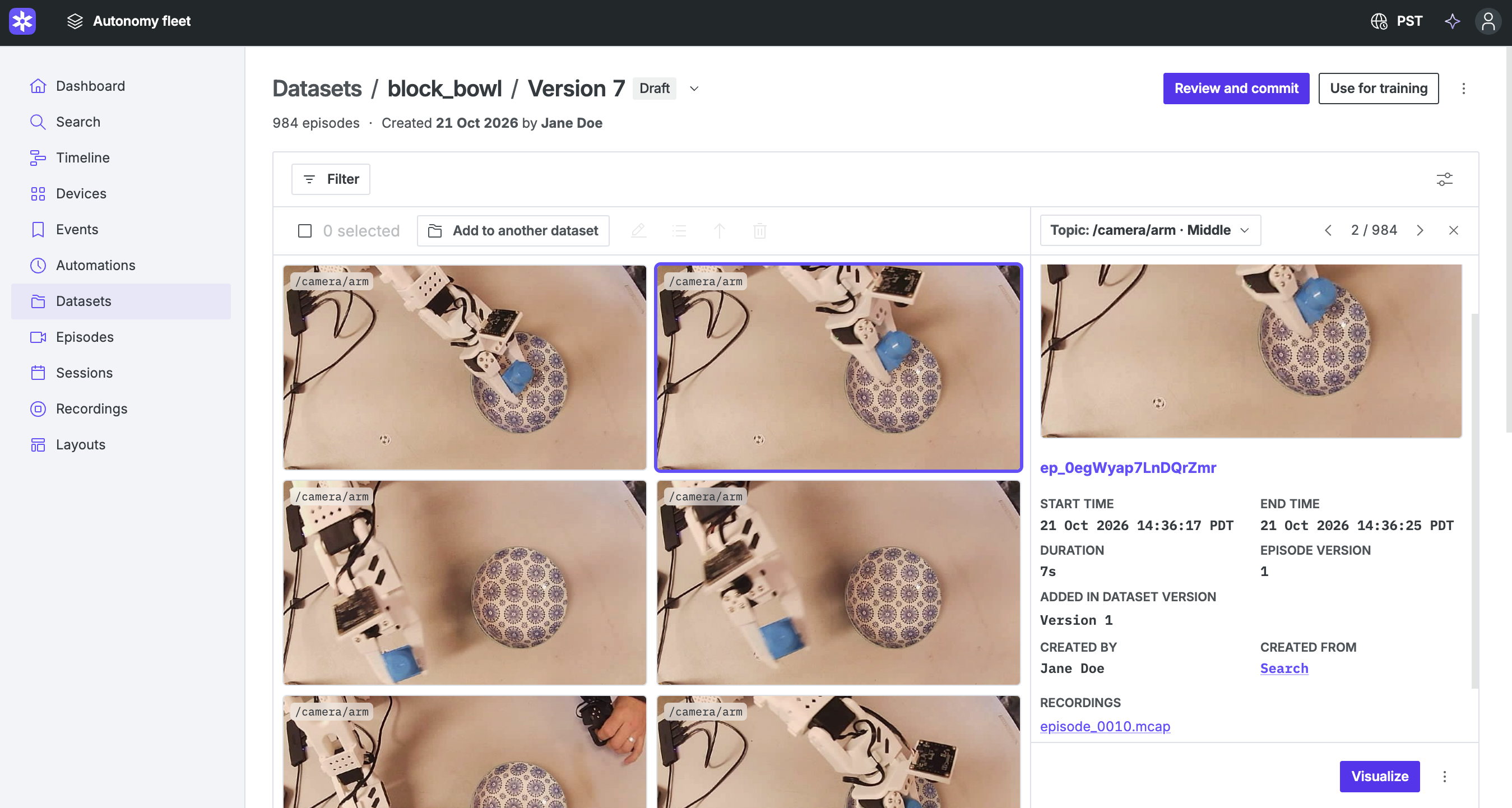
Datasets help ML teams curate episodes and manage annotations while tracking versioning and lineage. Integrate directly with frameworks like PyTorch and Ray. Learn more about Datasets.
🔍 Semantic search improvements since Actuate
Semantic search is out of beta on Pro, Enterprise, and Academic plans, available upon request. We're rolling out a new model that improves recall for small and off-center objects in the camera frame. Once semantic search is enabled for your organization, admins can choose which topics to index, index existing recordings, and clean up indexed data in Settings → Search. Load up to 400 results per search, up from 50, with Expand search and create Datasets using your results with Add to dataset. To request access, click Request access on the Search page. Read more about Semantic search.
🔌 External MCP connections
External MCP services are now available for all organizations with access to the agent sidebar. Members can connect their accounts to external services and use external tools from Foxglove. Connected services are also available to Automations. Admins control which services are allowed through Settings → Integrations → Allowed MCP services. Read more about External MCP.
🔐 OAuth applications
Org admins on Pro, Enterprise, and Academic plans can now register OAuth applications that call the Foxglove API as a user, limited to the scopes that user approves on a consent screen. Open Settings → Integrations → OAuth applications to create one. Read more about OAuth applications.
New & Improved
- Automations: Type @ in a prompt or the Run dialog to mention a device, recording, event, session, automation, layout, or project, and see those mentions as chips in Automation details, run details, and agent sidebar replies
- Automations: Choose a model family for each Automation, and see which model each run used
- Automations: Configure AI spend limits in Settings → Billing
- Automations: Attach up to 10 PNG or JPEG images to a prompt
- Automations: Filter automation runs by execution status and result
- Automations: Label run output and activity as AI-generated
- Automations: Run details explain why a run failed or stopped, including missing data, billing, and time limits
- Datasets: Edit many episodes at once from the Episodes page or a draft, step through them in one editor, and update drafts to latest in one action
- Datasets: Add episodes in one dialog, with a preview of existing episodes before adding
- Datasets: Draft version numbers are shown before the first commit
- Datasets: Agent sidebar remembers dataset draft approvals
- Datasets: Episode details appear in the overview menu
- Search: Warnings appear beside results instead of blocking them
- Image and 3D panels: Play H.264, H.265, VP9, and AV1 video in ROS
sensor_msgs/CompressedImagemessages without a message converter - Search and previews: Play video in ROS
sensor_msgs/CompressedImagemessages - Display menu to control column visibility and density on Search, Recordings, Events, Sessions, Episodes, Devices, and dataset pages
- Recordings, Events, Episodes, and Sessions: Gallery previews can start at the Start, Middle, or End of each item
- Timeline: Drag the playback range to move both ends together without changing its duration
- 3D panel: Display multiple comparison sources together
- State Transitions: Added Step display option that draws each state on its own lane with connecting risers
- 3D panel: Added Size setting to the Map layer to display maps up to 10 km or show high-zoom custom tiles
- i18n: Added Korean language support throughout the app
- i18n: Added Turkish language support throughout the app
- i18n: Corrected Japanese and Chinese terminology and translated JavaScript examples
- Log panel: On recorded data, hovering a message or its time on the timeline marks it with an orange bar along its left edge
- Downloads: MCAP downloads default to zstd chunk compression
- Extensions: Warn before installing unvetted extensions
- Bring Your Own Storage: Guided setup flow for org admins, ingest path policy to filter indexed files, and backfill for existing bucket files
- Primary Sites:
sa-east-1is available as an AWS bring-your-own-storage region - Bring Your Own Storage: Added AWS
us-west-1, Google Cloudasia-southeast1, and Azure East US 2 regions - Playback bar highlight now includes time ranges that are fully cached, where playback is unlikely to pause for loading
- Map panel now shows a single tooltip listing every feature under the cursor, instead of showing only one feature or overlapping tooltips
- Increased the maximum length of multi-line custom property values from 1024 to 2048 characters
- Desktop app: On macOS and Windows, the out-of-date card installs the update in Foxglove instead of linking to the download page
- Recordings page: Added drag-and-drop file import
Performance
- Web app: Translations load on demand, reducing initial load time
- API: External MCP tool cache refreshes are shared across requests
API
- Training: Use for training now requires Foxglove CLI v2.2.0 or later and
foxglove-client0.24 or later - BYOS: Enterprise organizations need an Infrastructure Credits balance to create new bring-your-own-storage sites
- Members: Added endpoints to list organization members and add or remove project members
- Automations: External MCP server grants are recorded in audit events
- Datasets: Raised recordings limit for episode creation
- MCP: Fixed image upload handoff
- Sessions: Audit events are recorded for session writes
- API: Reject unsupported keys in custom property patch API
- API keys: Now require
siteInboxNotificationTokenscapabilities to list, create, or delete site inbox notification tokens - Sign-ups and team invites using temporary or disposable email addresses are now rejected
- OIDC: Custom OIDC can no longer be configured on plans that do not include it
Security
- Fixed OIDC sign-in to enforce organization boundaries and reject impersonation attempts
- Improved security of OIDC sign-in and webhook delivery
- Fixed a security issue in how ROS 1 message definitions are loaded from files and live connections
Deprecated
- Projects API: The
lastSeenAtfield is no longer updated and will be removed in a future release - Plot panel: Deprecated the
enabledfield on thexAxisPathlayout config, which has no effect
Fixes
- Datasets: Fixed arrow keys not stepping through episodes in the editor after a tab was clicked
- Datasets: Replaced episodes stay in place
- Search: Center the loading icon on the Search page
- Edge Sites: Fix false "update available" warnings
- Viz: Warn when an OPFS write is too slow
- Image panel: Fixed "Decoding error" on H.264 video whose SPS contains scaling lists
- Fixed a crash where an extension's topic converter that throws during setup took down the visualization app; the error now shows in the Problems tab and names the extension
- Fixed GPU image decoding in the 3D and Image panels falling back to CPU decoding for images whose size in bytes isn't a multiple of 4
- Fixed image overlays not being drawn in the Image panel when Sync timestamps is on
- Fixed map anchors in the 3D panel using location fixes newer than the synchronized display time
- Fixed intermittent "Error decoding image" errors and dropped connections when streaming large ROS 1 messages, such as compressed camera images, in the desktop app
- Fixed a crash in the topic list when a topic is named after a built-in JavaScript property such as
toStringorconstructor
Downloads: Linux: deb amd64 arm64, snap amd64 | Windows: x64 arm64 | Mac: Apple Silicon Intel